Assignment 8
Recap:
In
the eighth session, we dealt with the
Magnetometer sensor and Compass in the Micro:bit.
To summarise:
1. The compass can detect
the earth's magnetic field.
2. The compass has to be
calibrated at first to ensure that the readings are accurate.
3. We discussed various
types of magnets and their properties.
4. We then discussed the
secrets of the Earth's magnetic field and how it can be used to detect the
direction.
5. A simple program to
calibrate and measure the magnetic strength of the earth and any other magnet.
6. Discussed the compass
heading and how to find directions using the Micro:bit.
7. Coded programs,
simulated the program, saved the programs on the laptop, downloaded the program
in the Micro:bit and ran the program on the Micro:bit.
8. Discussed the various
stages of creating the complete project -- requirement, design, code, simulate,
check, store, download (flash) and run.
9. Advanced students were
asked to check the Javascript code and
modify its contents.
The
class projects as described above can be completed and saved in the Desktop
folder.
What did
they learn:
Technology
Related
1. Magnetometer and
compass
2. Compass requires
calibration for accurate results.
Science Related
3. Magnets and their
important properties
4. Earth's magnetic field
5. Heading for finding
direction
Coding Related
6. Calibrate the Micro:bit on start.
7. Display the magnetic
strength.
8. Show the magnetic
heading reading as a string.
|
|
Assignments
Students
are encouraged to draw the Flowchart for the projects first and then attempt to
write the program in Blockcode or Javascript.
Request students to make a video of the project that are assigned and to send
me those for presentation.
Project
A:
Door
Alarm
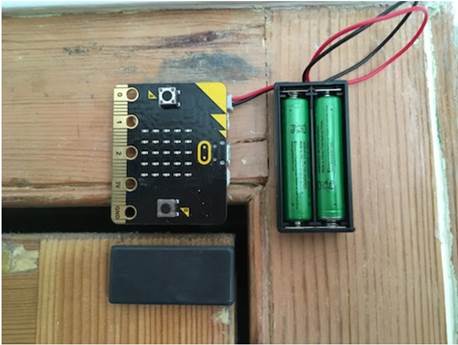
The aim of the project is to design a door alarm to tell you if anyone has been in your room. You will need a Micro:bit, battery pack, a magnet and some way of fixing them to the door as shown in the figure below.
1.
On Start, calibrate the compass, how heart and then pause for
3sec.
2.
Use the button A to test how strong the magnetic field is when
the door is closed and then how strong it is when open. Get the magic threshold
value of the magnetic field (say 200).
3.
In forever, measure how strong a magnetic field is and show an
angry face when the door is opened -- when the magnetic field is less than
(<) 200.
4.
If button B is pressed then reset the system
Project B:
Micro:bit Compass
The aim of the project
is use the Micro:bit as a Compass and find the
direction
1.
On start
- Show
heart and pause for 2sec.
- Calibrate
the compass
2.
Forever
- Read
the compass heading
- On
the screen showing North arrow (using show arrow command) when the
Heading is between 315 and 45, show East arrow when heading is between 45
and 135, show South arrow when heading is between 135 and 225 and show
West arrow when heading is between 225 and 315.
In all these projects, try to include comments
to the blocks that you are using.
Project
C:
Micro:bit Compass Extension 1
The aim of the project is use the Micro:bit as a
Compass and find the direction to include North-East, South-East, South_West and North_West.
Project D:
Detect Ferrous
Material
The sensitivity of the
earth magnetic field is disturbed by the Ferrous material. Construct a project
to detect if the object is ferrous or not.
Young Scientist Demonstrations
Please encourage kids to present any project related to Micro:bit restricted to whatever is covered in the
previous sessions.
This will help other kids to understand and replicate the
projects. Prefer not to make any demonstrations of the assignment, however
small variations around the assignments will be fine. I will try to give some
suggestions in the class as well.
We will invite the student for his/ her presentation and he/ she
will be the Scientist of the day presenting the work to all of us.
We have received very positive feedback on these demonstrations
globally which not only improves the science communication skills but also
makes them more confident in their academic pursuits along with pride in their
contribution to knowledge/ community.